Guides
How to add shuddhasattva.com as an app on Android
You can keep shuddhasattva.com on your Android phone like an app: an icon on the home screen, and it opens our shop without typing the address every time. This uses Google Chrome on the phone. It is not a download from the Play Store.
Aap Android phone par shuddhasattva.com ko app jaisa rakh sakte hain — home screen par icon, aur shop seedha khul jaata hai. Yeh Chrome se hota hai. Play Store se alag app download nahi karni padti.
Before you start / Pehle yeh dekhein
- Use Chrome. Instagram or Facebook in-app browser often hides this menu — tap Open in Chrome (or Open in browser) first.
- Instagram / Facebook ke andar site khuli ho to pehle Chrome mein kholen.
- Current Chrome updates on Android 10 and newer. Older phones may still show Add to Home screen on an older Chrome.
- Abhi Chrome ke naye updates Android 10+ par milte hain.
English — step by step
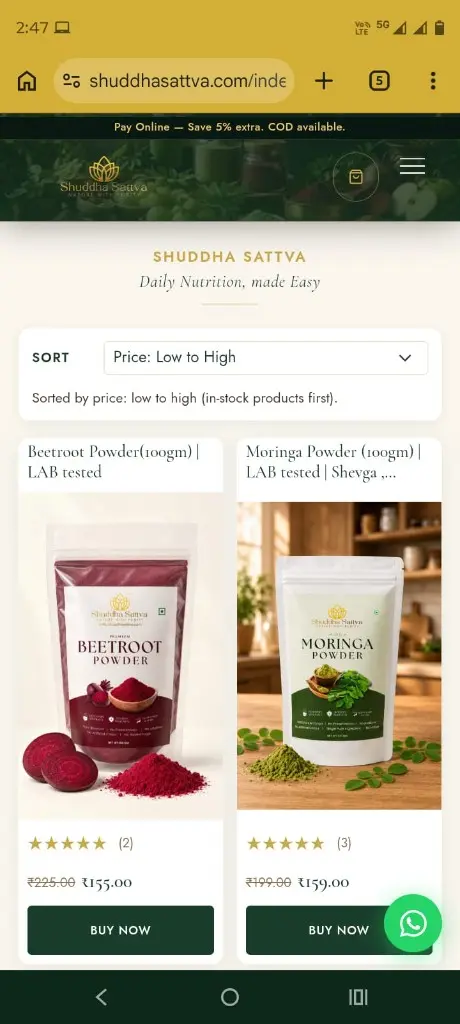
- Open Chrome and go to https://shuddhasattva.com (our home page is also /index.php). The photo at the top of this page shows the shop with Chrome’s three-dot icon at the top right.
- At the top right of Chrome, tap the three dots (not the website’s three-line menu next to the bag).
- In the list, tap Install and create shortcut (some Chrome versions say Install app or Add to Home screen — use whichever you see).
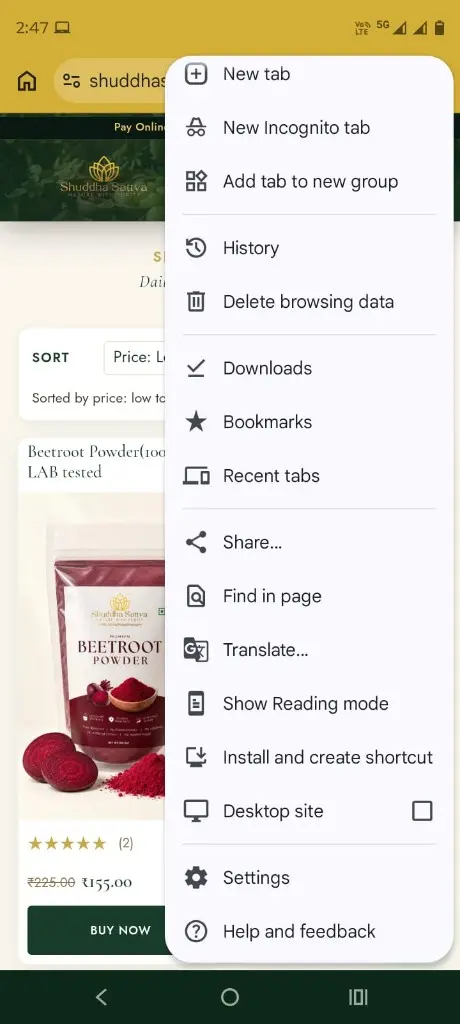
- Confirm Install or Add.
- Open the new Shuddha Sattva icon from the home screen or app list. Cart, checkout and orders work the same as in the browser — you are still on shuddhasattva.com.
हिंदी — आसान स्टेप्स
- फोन पर Chrome खोलें और shuddhasattva.com खोलें।
- ऊपर दाईं ओर Chrome के तीन बिंदु दबाएँ (वेबसाइट वाले तीन लाइन मेनू नहीं)।
- सूची में Install and create shortcut दबाएँ। अगर यह नाम न दिखे तो Install app या Add to Home screen चुनें।
- Install या Add से पुष्टि करें।
- होम स्क्रीन या ऐप लिस्ट से Shuddha Sattva का आइकन खोलें। यह वही वेबसाइट है — खरीददारी पहले जैसी रहेगी।
If you do not see Install / Agar option na dikhe
- You are in Instagram/Facebook — open the same link in Chrome.
- Scroll the Chrome menu; the line sits below Translate / Reading mode on many phones.
- Try Add to Home screen in the same three-dot menu. You still get an icon.
- Instagram/Facebook ke andar hon to pehle Chrome mein kholen. Menu mein neeche scroll karein. Add to Home screen bhi chalega.
Shop herbal powders on our home page or read the new powders note. Questions: contact us or FAQ.
Common questions
This guide is not a Play Store app. You install a shortcut to https://shuddhasattva.com from Chrome. Shopping, cart and checkout stay on our website.
Nahi. Yeh Chrome se shuddhasattva.com ka icon home screen par lagana hai. Play Store se alag app nahi hai.
Use Chrome on Android 10 or newer for current Chrome updates. On Android 8 or 9 an older Chrome may still offer Add to Home screen.
Tap the three dots in the Chrome address bar (top right of the browser), not the three lines on the Shuddha Sattva header. If you opened the site inside Instagram or Facebook, choose Open in Chrome first.
Yes. The icon opens shuddhasattva.com. Cart, OTP checkout and orders work the same as in the mobile browser.